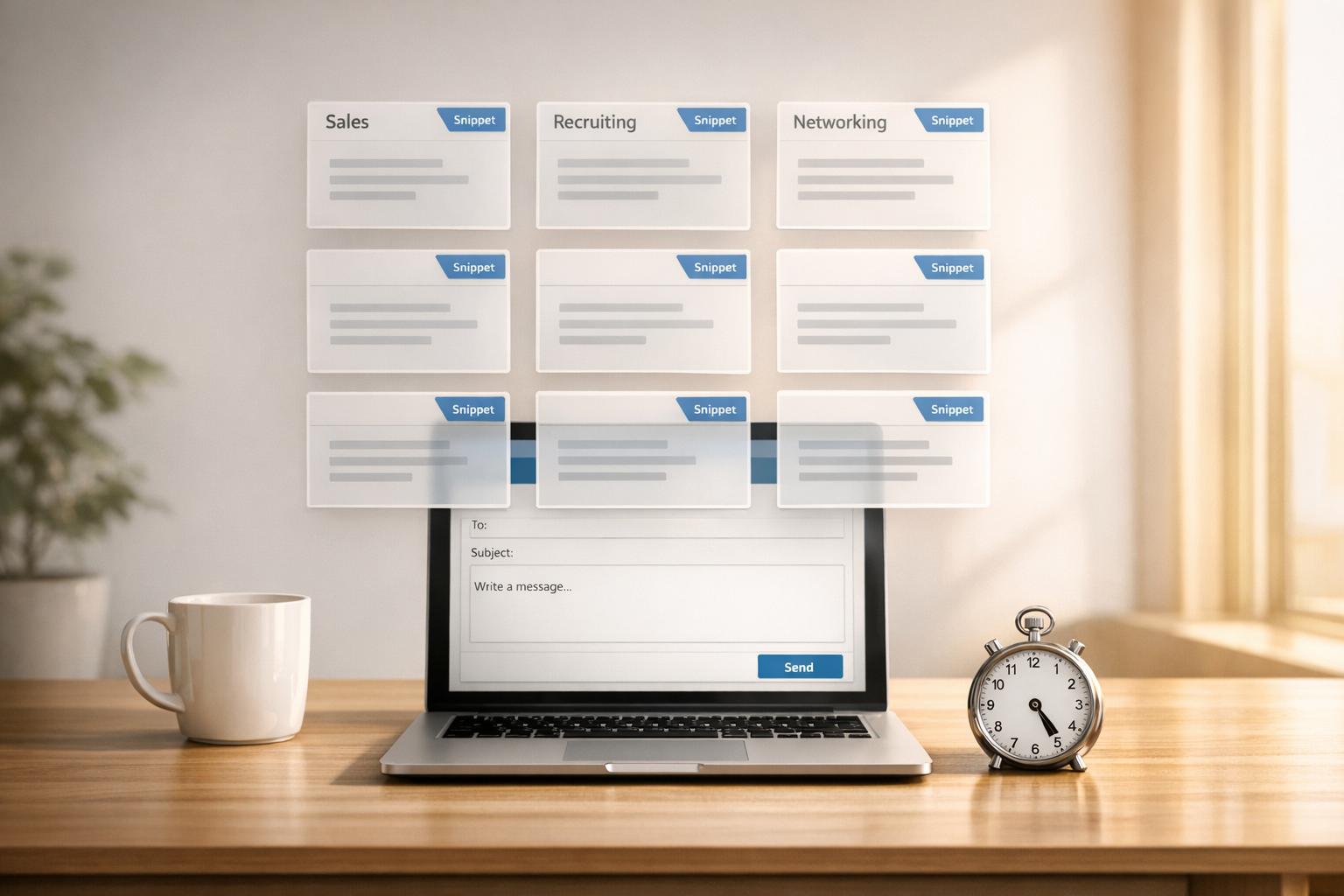
Tired of writing the same LinkedIn messages repeatedly? Pre-built LinkedIn message templates can save you hours while boosting response rates. These snippets act as starting points for your outreach, making it faster and easier to personalize messages for sales, recruiting, or networking.
Key takeaways:
- Why it works: LinkedIn messages typically see 10-30% response rates, far higher than cold emails (1-5%).
- Personalization matters: Adding a tailored note increases reply rates, with personalized connection requests seeing up to 3.5x higher acceptance rates.
- Time saved: Structured templates can reclaim 3-8+ hours per week.
- Proven strategies: Use relevance hooks, clear value statements, and low-pressure calls-to-action for better results.
Templates aren’t just copy-paste tools – they’re frameworks that, when personalized, help you connect meaningfully while maintaining efficiency.
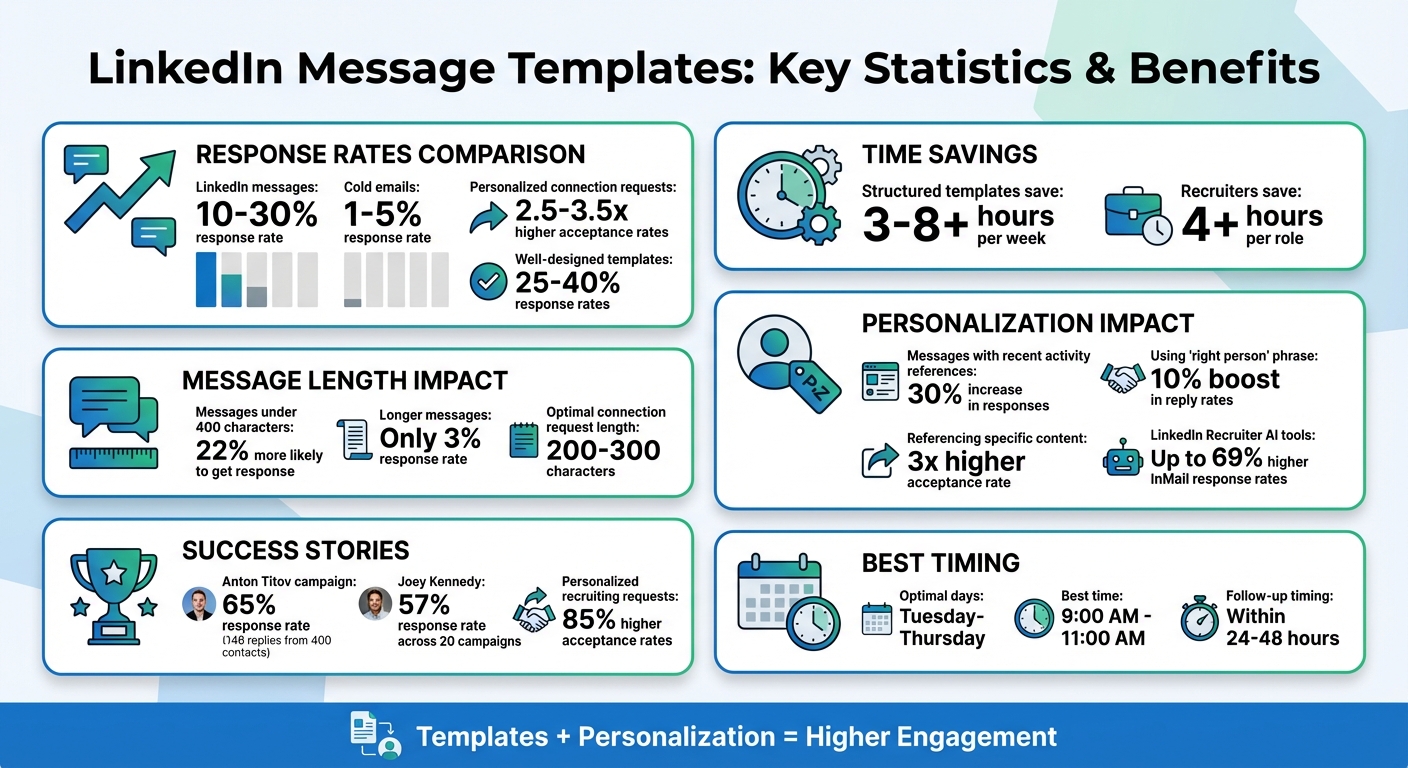
LinkedIn Message Templates: Key Statistics and Time-Saving Benefits
Benefits of Using LinkedIn Message Templates
Save Time with Pre-Built Snippets
Pre-built snippets are a lifesaver when it comes to outreach. Instead of starting from scratch every time, you can rely on a proven framework and tweak it with personal details – like the recipient’s name, their company, or a recent milestone they’ve achieved. This approach is especially handy for high-volume outreach, whether you’re scouting top talent or building your sales pipeline.
Take Anton Titov, Founder at Archway.Finance, as an example. In June 2025, he used automated templates to contact 400 agency owners. By leveraging a human-like snippet structure rather than manually writing each message, his campaign secured 148 replies – a 65% response rate – and helped raise over $1 million in funding. This shows how blending personalization with efficient timing can deliver both speed and strong results.
The time savings are no small thing. Professionals using structured snippet systems report reclaiming over 8 hours a week from manual outreach tasks. No more staring at a blank screen; instead, you can focus on adding those personal touches that spark replies. Beyond saving time, these templates ensure your messages stay polished and professional.
Keep Your Messaging Consistent
Consistency is key to building trust and making your messages more effective. When every message sticks to a proven structure – like starting with a relevance hook, then a value statement, and finishing with an easy call-to-action – your brand consistently feels professional and approachable. Templates serve as a guide, keeping your tone conversational while clearly communicating your value, whether it’s your first message or your fiftieth.
Why does this matter? Decision-makers can spot generic or inconsistent messages within seconds. Using a well-thought-out template keeps your outreach polished and helps you stay within LinkedIn’s 200-character limit for connection requests, ensuring your message is complete and engaging. Plus, it helps you avoid sounding robotic or overloading your message with corporate jargon.
Personalize Templates Quickly
Modern tools make personalization easier than ever. They can pull data directly from LinkedIn profiles – like job titles, company names, or recent activities – and seamlessly add it to your snippet using AI variables. This allows you to personalize messages at scale without spending hours researching each recipient. You can mention a recent post they shared or highlight a mutual connection, all while sticking to your core template.
Here’s the payoff: personalized connection requests see acceptance rates that are 2.5 to 3.5 times higher than generic ones. It’s proof that small, thoughtful adjustments to a reliable template can make a big impact.
sbb-itb-3e8f5dc
LinkedIn Message Templates for Common Scenarios
Sales Outreach Templates
When it comes to sales outreach, it’s all about focusing on the prospect, not pushing your product. The HEART framework – Hook, Empathy, Authority, Request, and Thanks – offers a great way to structure your message. Start with a hook that references something relevant, like a recent post, a milestone, or even a job change within the last 90 days. Follow that by showing empathy for their challenges, establishing credibility, and wrapping up with a soft, non-pushy request like, “Mind if I send over a quick resource?”.
Keep it short. Messages under 400 characters are 22% more likely to get a response, while longer ones often see that rate drop to just 3%. For example, you could say:
"Hi [Name], I came across your post about scaling customer support – it sounds like a challenge we’ve helped [Company] tackle before. Would you be open to me sharing some insights?"
This keeps the focus on providing value while respecting their time.
Joey Kennedy, VP of Sales at KMS Healthcare, achieved a 57% response rate across 20 LinkedIn campaigns by A/B testing his templates. His standout tactic? The "right person" strategy. By acknowledging he might not be speaking to the decision-maker, he often secured referrals. In fact, using the phrase “right person” can boost reply rates by 10%.
Recruiters, too, can adapt these principles by aligning their outreach with candidates’ career paths.
Recruiting and Hiring Templates
When reaching out to candidates, your message should immediately answer two key questions: “Why me?” and “Why now?”. For passive candidates, this means acknowledging their career journey. Here’s an example:
"Hi [Name], I noticed your recent move from an individual contributor role to a leadership position at [Company]. We’re building a similar team at [Your Company], and your expertise in [specific skill] could be a perfect fit. Would you be open to a quick chat?"
For active candidates, speed and clarity matter most. A direct, outcome-focused template might look like this:
"Hi [Name], we’re hiring a [Role], and your experience with [specific skill] really stood out. Are you open to exploring new opportunities? Happy to share more details if you’re interested."
The goal here is to make it easy for them to respond with a simple yes or no, minimizing decision fatigue.
Using LinkedIn Recruiter‘s AI-assisted tools can boost InMail response rates by up to 69%. Additionally, recruiters who rely on specialized tools report saving more than 4 hours per role by cutting down on manual tasks. Personalized connection requests also perform better, achieving up to 85% higher acceptance rates compared to generic ones.
Networking and Connection Templates
When networking, your messages should feel personal and curious, not transactional. A great connection request highlights a specific detail about the recipient – like a recent post, a shared background, or a project they’re working on – and provides a clear reason for reaching out. For instance:
"Hi [Name], I really enjoyed your recent post on AI ethics. As a fellow [University] alum working in this space, I’d love to stay connected and follow your work."
This approach fits within LinkedIn’s 200- to 300-character limit for connection requests and shows genuine interest.
Avoid the dreaded “pitch-slap” – don’t include a sales pitch or favor in your first message. Once the connection is accepted, follow up with a quick thank-you note within 24 to 48 hours to start building the relationship.
"Networking and selling are not the same thing. Networking can get you in front of prospects… but a LinkedIn connection request isn’t the place for a sales pitch."
- Sujan Patel, Founder, Mailshake
Timing also plays a role. Sending connection requests between Tuesday and Thursday, ideally from 9:00 AM to 11:00 AM, tends to yield the best results. If you share a mutual connection, mention them early in your message – it adds credibility and acts as social proof. Referencing specific content from the recipient can also triple your acceptance rate compared to generic outreach.
How to Organize and Deploy Your Snippets
Organize Snippets by Purpose
Start by categorizing your snippets into high-level folders based on their primary use. For example, you might create folders for Sales/Business Development, Recruiting/Hiring, Networking, or Job Seeking. Within each folder, break things down further by specific intent. For instance, under Networking, you could have subfolders for "Event Follow-up", "Mutual Connection Reference", "Content Engagement", or "Alumni Outreach."
Another way to organize is by the stage of your outreach funnel. For example, connection requests, which are limited to 200 characters, serve a different purpose than follow-up messages. Keeping these separate makes them easier to access. If your work involves a specialized industry, you can also create niche categories like "Tech-focused Agency Outreach" or "Geographic-specific Networking" to make retrieval even faster.
Once your snippets are neatly organized, the next step is to integrate them into your daily routine.
Add Snippets to Your Daily Workflow
Having snippets stored is helpful, but being able to deploy them quickly is what makes them powerful. Tools like Cesar.chat let you save and instantly retrieve unlimited snippets using keyboard shortcuts. You can also sync these snippets with CRMs like HubSpot, Salesforce, or Notion to ensure consistency across your team.
To get the most out of your snippets, analyze how they perform in your campaigns. This helps you identify which messages are working and which ones need tweaking. Regular analysis ensures your outreach remains effective and aligned with your goals.
Update Snippets Based on Results
Keeping your snippets up-to-date is crucial for staying relevant. Start by testing each template on a smaller scale – try sending it to 20 to 30 prospects – and track the results. Monitor acceptance and response rates for each category. For example, if your Alumni Outreach snippets are getting a 60% acceptance rate but your Direct Sales templates are only at 15%, it’s clear where you need to adjust your focus.
"The problem isn’t that you’re using templates, it’s that you’re using the SAME templates as everyone else."
- Saurav Gupta, SalesRobot
If response rates dip below benchmarks – typically 40% to 60% for personalized connection requests – or your messaging starts to feel stale, it’s time for a refresh. Update your hooks, avoid overused phrases like "hope this finds you well", and incorporate timely industry trends or company news. These tweaks can make your outreach feel more genuine and engaging.
These 3 LinkedIn message templates that brought our customers $$$ [in-depth analysis]
How to Personalize Message Templates
Templates are great for efficiency, but true success lies in personalization. Taking just two minutes to research a recipient’s profile can be the difference between a 20% and a 70% acceptance rate. The goal? Make every message feel tailored, even when using pre-written snippets. Here’s how to weave personal touches into your templates effectively.
Reference Profile Information
Look for specific details like recent posts, industry insights, job changes, company news, or shared connections. For example:
- If they’ve posted about attending a conference, mention it.
- Acknowledge a recent promotion or career move.
- Highlight shared experiences, like attending the same university or knowing a mutual contact.
Referencing mutual connections can make your outreach feel more genuine. For instance:
"I noticed we both know Sarah Chen from the 2024 SaaS Summit – she mentioned you’re doing great work in customer retention".
Messages that include recent activity or personalized elements see a 30% increase in responses. Even adding just one or two tailored details can boost reply rates by 2.5x. The key is to use these insights to craft messages that speak directly to the recipient’s unique situation.
Match Your Message to Recipient Needs
A one-size-fits-all approach won’t resonate. Instead, adapt your message to address the recipient’s specific challenges. For example:
- For a plant manager, focus on reducing equipment downtime.
- For a healthcare administrator, emphasize ways to ease administrative burdens.
- For a VP of Sales at a fast-growing startup, highlight solutions for scaling challenges.
- For a CFO at a large enterprise, address cost-saving or compliance priorities.
As Saurav Gupta from SalesRobot puts it:
"Real personalization is about understanding their actual world, their specific pain points, and what’s happening in their industry right now".
Use a simple three-part framework to structure your message:
- Relevance hook: Why you’re reaching out to them.
- Value statement: What they stand to gain.
- Call-to-action: Make it easy for them to respond or engage.
Keep your messages concise – under 100 words works best, especially since many people read on mobile.
Keep Templates Natural and Conversational
Write your messages the way you’d text a colleague. Use the recipient’s name naturally within the sentence rather than starting with it awkwardly. Avoid filler phrases like "just", "really", or "I was wondering if" – they dilute your message.
Instead of jumping straight into a pitch, ask for permission:
"Mind if I ask a quick question?" or "Interested in at least pointing me in the right direction?" These approaches reduce pressure and spark curiosity.
End with open-ended questions like "What’s your take on [Topic]?" to encourage a response and keep the conversation going.
For efficiency, tools like Cesar.chat allow you to save and quickly deploy personalized snippets with keyboard shortcuts. This way, you can balance speed with authenticity, ensuring every message feels genuine while setting the stage for meaningful follow-ups.
Conclusion
These strategies can transform your LinkedIn outreach into a more efficient and productive process. Using message templates saves time, keeps your communication organized, and leads to higher-quality interactions. By cutting down on repetitive typing, professionals can reclaim an impressive 3 to 8+ hours each week. Plus, well-designed templates can boost response rates to 25-40%, far surpassing the results of generic cold messages. The combination of a strong framework with personalized touches ensures consistency while making recipients feel genuinely valued.
The secret lies in finding the right balance between efficiency and authenticity. Data shows that personalization significantly enhances the performance of templates – customizing your messages thoughtfully can lead to better response rates and improved business outcomes. This highlights the importance of blending structured templates with genuine, human-centric communication.
If you’re just starting, focus on creating 5-10 snippets for your most frequent scenarios, such as connection requests, follow-ups, and initial outreach. Organize these templates by purpose, test their effectiveness, and refine them based on the responses you receive. Tools like Cesar.chat make this process easier by offering features like saved snippets, keyboard shortcuts, and CRM integration. These tools help you reply faster while maintaining a personal touch.
With organized templates, you can reduce inbox overwhelm and improve your LinkedIn communication. The right approach allows you to manage conversations effectively, strengthen relationships, and build meaningful connections.
FAQs
How many snippets should I start with?
Start with 6 to 20+ pre-written snippets tailored to your messaging needs. These templates are designed for different LinkedIn scenarios like sales outreach, networking, and follow-ups. Begin with a smaller set to keep things manageable, then gradually add more as your workflow grows. This approach helps you stay professional while saving time.
How do I personalize a template without sounding robotic?
To make a LinkedIn message feel personal and authentic, focus on tailoring it to the recipient. Highlight something specific, like a recent achievement they’ve shared, a post they’ve written, or even news about their company. If you have mutual connections or shared interests, mention those to establish a natural connection. Skip overused phrases like "Hope this finds you well", and instead, draw from details in their profile – such as their career path or skills – to create a message that feels thoughtful and genuine. This approach shows you’ve taken the time to engage meaningfully.
What should I track to improve acceptance and reply rates?
To improve acceptance and reply rates, pay attention to critical aspects such as personalization, message length, relevance, timing, and mentioning mutual connections or shared content. These factors can make a big difference in how your messages are received. Use these insights to fine-tune your approach and make your messaging strategy more effective.