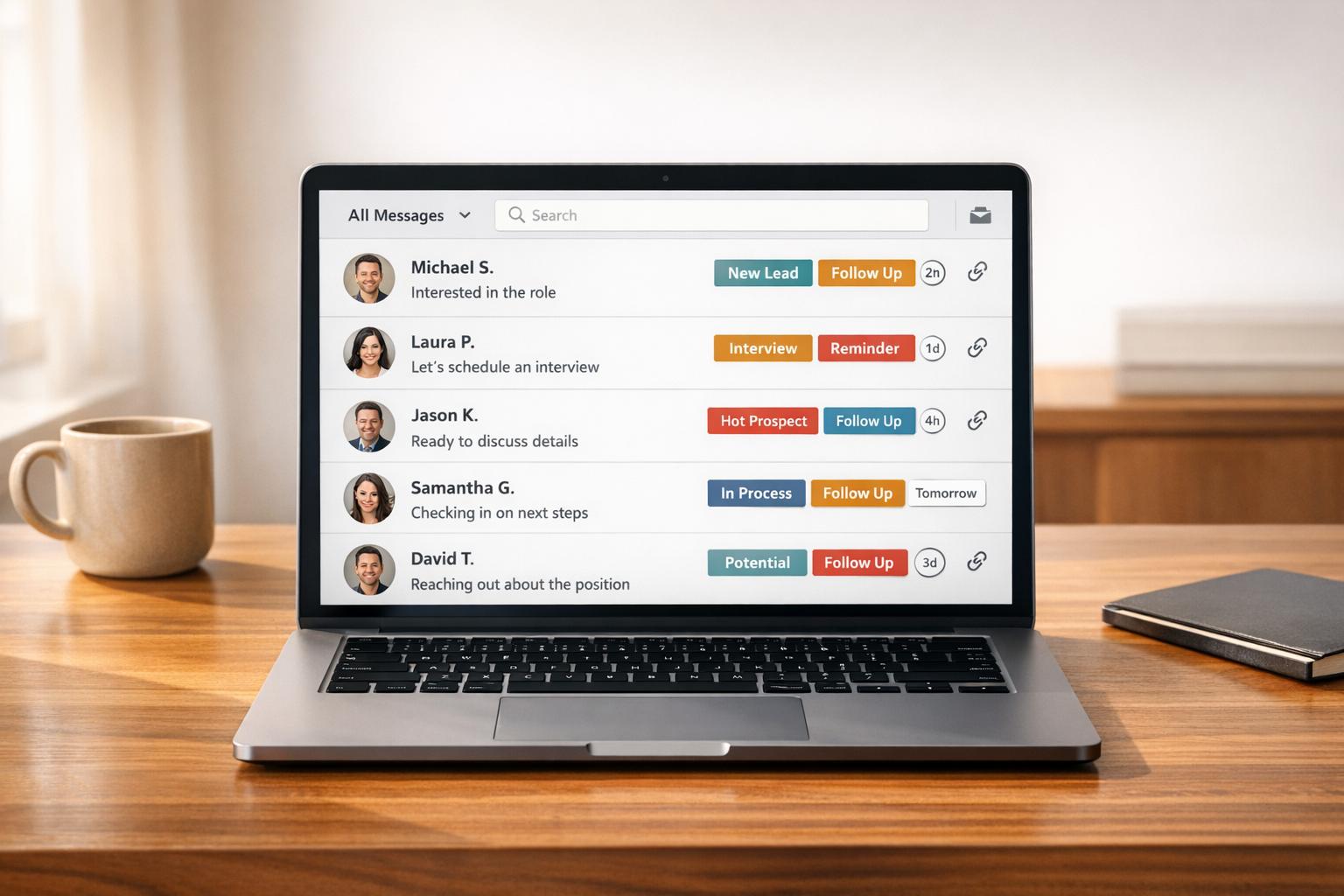

Managing LinkedIn messages can be overwhelming, especially with LinkedIn’s lack of advanced inbox features. To stay organized and save time, inbox management tools are essential. However, using tools that violate LinkedIn’s terms (e.g., aggressive automation or scraping) can lead to account suspension. Below are three tools that enhance LinkedIn message management while staying compliant:
- Cesar.chat: Offers split inboxes, labels, reminders, and official-style API interactions to avoid risky automation. Plans start at $24/month.
- Dux-Soup Starter Edition: Focuses on light automation with randomized activity to mimic human behavior. Priced at $14.99/month but carries higher detection risks.
- LeadDelta: Provides bulk messaging, tagging, and CRM integrations for efficient network management. Plans start at $11.67/month.
Quick Comparison
| Feature | Cesar.chat | Dux-Soup Starter Edition | LeadDelta |
|---|---|---|---|
| Inbox Organization | Split inboxes, labels | Basic tagging | Smart Inbox, tagging |
| CRM Integrations | HubSpot, Salesforce | None (Starter Edition) | Zapier, HubSpot (beta) |
| Safety Approach | Official API | Mimics human behavior | No full automation |
| Starting Price | $24/month | $14.99/month | $11.67/month |
Choose a tool that fits your workflow and budget while ensuring compliance with LinkedIn’s guidelines.
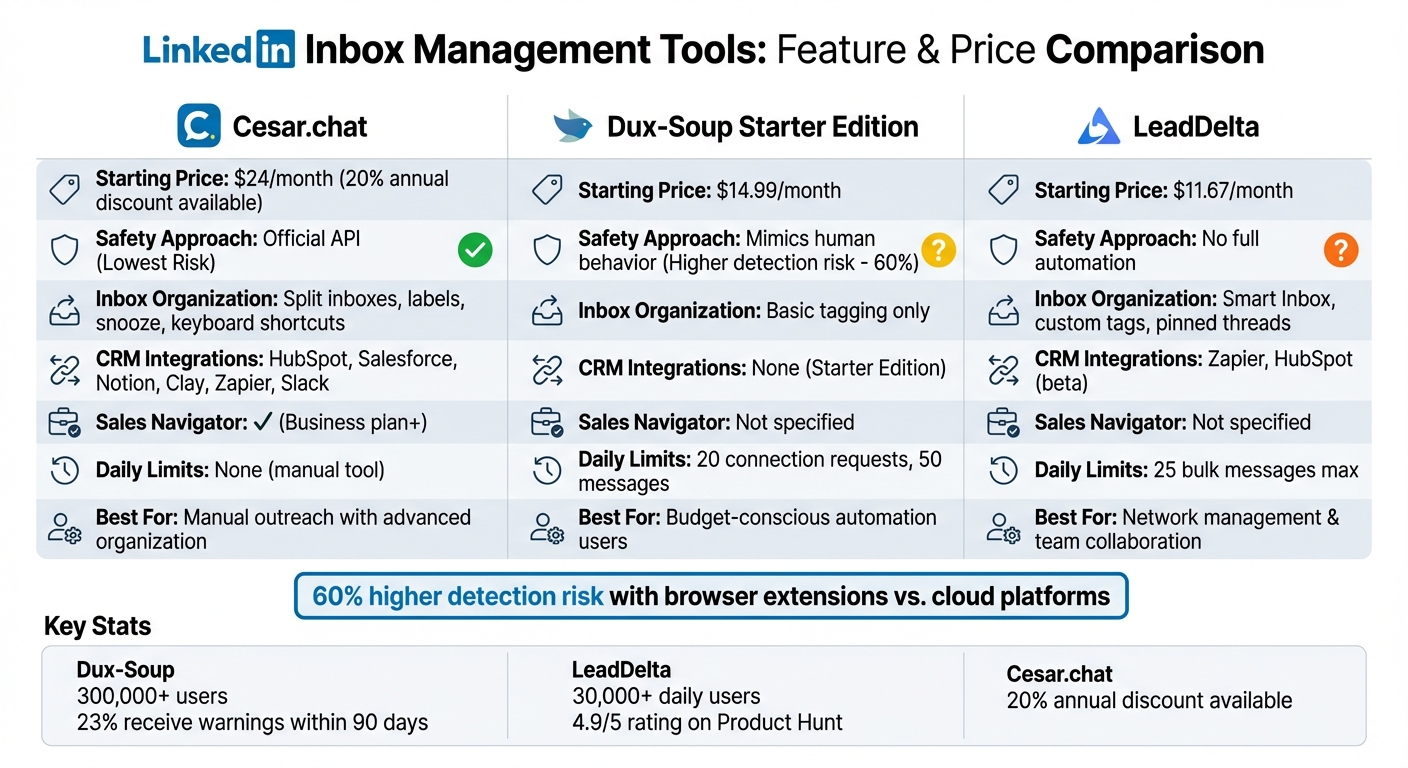
LinkedIn Inbox Management Tools Comparison: Features, Pricing & Compliance
1. Cesar.chat
Compliance with LinkedIn TOS
Cesar.chat takes a cautious approach to automation, ensuring compliance with LinkedIn’s Terms of Service. Instead of relying on browser extensions or data scraping, it uses official-style API interactions. According to Cesar.chat, "We use official-style API interactions and don’t do any botting or scraping that would put your account at risk." Think of it like using a third-party app to access Gmail – you’re still viewing your LinkedIn messages, just through an upgraded interface that helps you manage outreach manually while staying within LinkedIn’s guidelines.
Inbox Organization Features
Cesar.chat makes managing your LinkedIn messages easier with tools like Split Inboxes, which allow you to label and categorize conversations for better organization. This feature helps you separate high-priority leads from general networking messages. The Snooze function is another handy tool, temporarily hiding threads and bringing them back when it’s time to follow up. To streamline navigation, there are keyboard shortcuts, while saved Snippets let you store frequently used responses, saving time on repetitive tasks. For users juggling standard LinkedIn messages alongside Sales Navigator conversations, the Business plan consolidates everything into one seamless interface.
CRM and Tool Integrations
The Business plan, priced at $32 per month, takes productivity a step further by syncing your LinkedIn conversation data, labels, and notes with popular tools like HubSpot, Salesforce, Notion, Clay, Zapier, Make, and Slack. These integrations eliminate the need for manual data entry, allowing you to log LinkedIn conversations directly into your CRM. This setup is perfect for professionals looking to streamline their workflow while maintaining flexibility as their business grows.
Pricing and Scalability
Cesar.chat offers three pricing tiers, with a 20% discount available for annual subscriptions:
| Plan | Monthly Price | Key Features |
|---|---|---|
| Basic | $24 | Unlimited labels, snippets, reminders, and voice notes |
| Business | $32 | Includes everything in Basic, plus up to 3 integrations, Sales Navigator support, and analytics |
| Enterprise | $40 | Includes everything in Business, with unlimited sync destinations, white-glove setup, and VIP support |
This straightforward pricing structure works well for everyone – from solo professionals to larger teams needing advanced features and dedicated support.
2. Dux-Soup Starter Edition
Compliance with LinkedIn TOS
Dux-Soup’s Starter Edition is designed to mimic human behavior, reducing the chances of detection. It randomizes profile visits, ranging from 25 to 125 per hour, and includes a 5-minute pause every 20 visits to make activity appear natural. By default, the tool limits users to 20 connection requests and 50 direct messages daily, keeping activity at a low-risk level.
The tool also features a "Snooze" option, which halts activity once daily limits are reached. Using the Activity Planner, you can schedule operations for specific times, spreading tasks throughout the day for a more natural appearance. However, research from 2026 highlights that browser-based extensions like this carry a 60% higher detection risk compared to cloud platforms due to DOM manipulation. Additionally, about 23% of Dux-Soup users reportedly receive LinkedIn warnings or restrictions within their first 90 days if they don’t stick to safe settings.
Despite these risks, the tool includes practical features to streamline your LinkedIn prospecting efforts.
Inbox Organization Features
The Starter Edition provides basic tools for organizing prospects, such as profile tagging for categorization and an activity log to track visits, messages, and invitations. While it lacks the centralized dashboard available in higher-tier plans, you can export prospect data and activity logs to CSV files for external organization. Automated profile visits also trigger "who viewed your profile" notifications, potentially sparking organic conversations that you can manage directly in LinkedIn’s inbox.
CRM and Tool Integrations
At $14.99 per month, the Starter Edition does not include built-in CRM integrations – those are available only in the Turbo ($55.00/month) and Cloud ($99.00/month) plans. If you rely on tools like HubSpot, Salesforce, Pipedrive, or Zapier workflows, upgrading is necessary. For now, exporting LinkedIn profile data to CSV files and manually uploading it to your CRM may work for individual users but can become cumbersome for larger teams.
Pricing and Scalability
The Starter Edition is priced at $14.99 per month (or $11.25/month with annual billing), making it an affordable entry point for LinkedIn automation. Since its launch in 2015, the tool has gained over 300,000 users worldwide as of 2026. It holds strong ratings, with 4.4/5 on the Chrome Web Store (440 reviews) and 4.3/5 on G2 (82 reviews). Ashish Janiani from Motivational Diaries shared that his first campaign with Dux-Soup generated steady leads, leading to a closed $12.5k contract within 30 days of use.
3. LeadDelta
Compliance with LinkedIn TOS
LeadDelta prioritizes user safety by steering clear of fully automated message sequences. However, it does allow limited bulk messaging – up to 25 connections at a time – and extracts contact data, which carefully balances LinkedIn’s Terms of Service guidelines. Mario Marquez, CEO of Wiser Translations, highlights its clean interface and focus on account safety. With over 30,000 professionals using the tool daily and a spotless record on the Chrome Web Store, LeadDelta has built a reputation for reliability. By addressing safety concerns, the platform also enhances message management with its organizational tools.
Inbox Organization Features
LeadDelta’s Smart Inbox consolidates LinkedIn messages, outreach, and notes into one streamlined space, helping users manage their inbox efficiently. Features like custom tags, pinned threads, and starred conversations ensure important leads are easy to track.
The LinkedIn Sidebar is another standout feature, offering quick access to tags, notes, and contact details directly from LinkedIn without needing to switch tabs. This sidebar, combined with the tagging system, allows users to assign multiple labels and notes to connections, creating tailored pipelines for sales or recruitment.
Users can manage networks of up to 30,000 connections and use the "last messaged" filter to identify contacts who haven’t been reached in a while. This approach keeps professionals organized while minimizing risks of account suspension.
Ivana Todorovic, Co-Founder at TalentKit, shared: "LeadDelta is my go-to place for any direct communication on LinkedIn. I’m using it daily, saving me a lot of time and effort. When I say a lot, I mean something that took me an hour, now takes me 5 minutes!"
CRM and Tool Integrations
LeadDelta goes beyond organization with integrations that simplify data management. The platform works seamlessly with Zapier for workflow automation and offers a beta HubSpot integration. Its LinkedIn Sidebar captures leads in bulk from search pages, enriches them with contact data using a Waterfall Enrichment system (a credit-based, pay-as-you-go model), and syncs everything directly into your CRM – eliminating the need for manual data entry.
For teams, the Workspaces feature allows collaborative management of relationships and warm introductions without overlapping outreach efforts. This makes it especially useful for businesses that rely on team-based LinkedIn strategies.
Pricing and Scalability
LeadDelta provides four pricing options to suit various needs:
- Starter at $11.67/month: Includes basic CRM features, auto-sync, and tagging.
- Pro at $24.17/month: Adds the LinkedIn sidebar, CSV export, and AI-powered inbox tools.
- Business at $82.50/month: Designed for teams, with shared tags and notes for collaboration.
- Enterprise: Custom pricing tailored to larger organizations.
The jump from Pro to Business represents a 240% price increase. A 10-day free trial is available, and no credit card is needed to get started.
LeadDelta has earned a 4.9/5 rating on Product Hunt and was named the #1 SaaS Product of 2022. While praised for its features, some users note challenges like a steep learning curve for tagging, inconsistent customer support, and difficulties with subscription cancellations. Still, its pricing structure makes it a viable option for teams of all sizes aiming to manage LinkedIn connections effectively.
Feature and Price Comparison
Balancing compliance with productivity is key when choosing the right tool. Below is a side-by-side comparison of verified features and pricing for each option.
| Feature | Cesar.chat | Dux-Soup Starter Edition | LeadDelta |
|---|---|---|---|
| Primary Focus | Speed & Organization (Manual) | Automated lead generation | Not specified |
| Inbox Organization | Split inboxes, labels, snooze | Not available | Not specified |
| Response Tools | Snippets and keyboard shortcuts | Not available | Not specified |
| CRM Sync | Integrates with HubSpot, Salesforce, Notion, Clay, Zapier, and Slack | Not available | Not specified |
| Sales Navigator Support | Supported on Business/Enterprise plans | Not specified | Not specified |
| Safety Method | Official-style API (no botting or scraping) | Browser-based automation that mimics human behavior | Not specified |
| Daily Limits | None (manual tool) | 20 connection requests and 50 messages daily | Not specified |
| Starting Price | $24/month | Free | Not specified |
| Annual Discount | 20% off when billed annually | Not specified | Not specified |
This table highlights the essential differences in features and pricing, making it easier to identify which tool aligns with your needs.
Cesar.chat Pricing Plans
Cesar.chat offers three subscription tiers:
- Basic: $24/month – Includes unlimited labels, snippets, reminders, and voice notes.
- Business: $32/month – Adds up to 3 integrations, Sales Navigator support, and analytics.
- Enterprise: $40/month – Includes white-glove setup, unlimited sync destinations, and VIP support.
All plans come with a 20% discount if billed annually.
Dux-Soup Starter Edition and Paid Plans
While the Starter Edition of Dux-Soup is free, its features are limited. Paid plans include:
- Pro: $14.99/month – Offers auto-connect, enhanced messaging, and tagging.
- Turbo: $55/month – Includes drip campaigns and CRM connectivity.
- Cloud: $99/month – Provides always-on outreach capabilities.
LeadDelta Pricing and Features
For LeadDelta, detailed information about features and pricing is not readily available from verified sources.
Conclusion
Choosing the right LinkedIn inbox management tool means balancing safety and efficiency. As Kavya M, GTM Engineer at OutXAI, wisely puts it:
"The difference between getting results or getting restricted comes down to what tools you use, how you use them, and how well you stay under the radar".
Focus on Compliance
Start by ensuring the tool adheres to LinkedIn’s guidelines. Solutions that use official API interactions – like Cesar.chat – are built with compliance in mind. If automation is part of your workflow, look for features like randomized delays, daily limits on messages, and warm-up protocols that replicate natural behavior. These safeguards not only protect your account but also support consistent performance.
Choose Based on Your Workflow
The best tool is one that complements your daily operations. For instance, if manually managing a high volume of LinkedIn messages is slowing you down, Cesar.chat offers features like keyboard shortcuts, saved message templates, and split inboxes that can save you up to 10 hours each week [6,42]. For teams handling multiple accounts, a unified inbox eliminates the hassle of constant logins and streamlines collaboration.
Weigh Budget Against Features
While cost is important, don’t overlook infrastructure. Cloud-based tools often provide better security through features like dedicated proxies and IP rotation. To make an informed decision, take advantage of free trials – typically lasting 7 to 14 days – to test the user interface and ensure compatibility with your existing CRM setup.
FAQs
How can I tell if a LinkedIn inbox tool is actually TOS-compliant?
To keep a LinkedIn inbox tool aligned with LinkedIn’s Terms of Service, make sure it adheres to the platform’s rules. This includes avoiding scraping, automated access, or any bot activities that go against LinkedIn’s User Agreement. Opt for tools that emphasize security and clearly state their compliance. Look for recommendations in reliable resources or well-regarded articles to guide your choice.
What LinkedIn messaging habits lower the risk of account restrictions?
To avoid having your LinkedIn account restricted, prioritize genuine interactions. Steer clear of sending overly generic or spammy messages, and make sure your activity aligns with normal platform behavior. Engaging thoughtfully and consistently not only keeps you in line with LinkedIn’s terms of service but also helps you build real, meaningful connections.
Which inbox features save the most time when replying to lots of DMs?
Time-saving inbox tools can make managing LinkedIn messages much easier. Features like split inboxes allow you to prioritize important messages, while snooze options let you set reminders for follow-ups at a later time. Keyboard shortcuts speed up navigation, and automated CRM syncing helps keep conversations organized and simplifies follow-ups. Together, these tools enable professionals to handle large volumes of messages more efficiently.